
(More) Colors
More functions for easy chat color management

Описание (от автора):More functions for easy chat color management
Добавляет целый букет цветов (спасибо asherkin!) для плагинов использующих чат. Полностью (почти) совместимы с оригинальными colors.inc. Вы можете использовать различные цвета команды в одном сообщении! Это для TF2. Это бета-версия и может быть изменена.
Описание (от себя):
Добавляет множество цветов, работает также в CSS, но не очень красиво в консоли в списке целых 149 цветов, наслаждайтесь.
Облегчённая версия (morecolorslite.inc) имеет только функцию CGetTeamColor .
Оба файла в архиве (morecolors.inc и morecolorslite.inc).
ТОЛЬКО ДЛЯ OB!!!
Поддержка последних версий игр:
- Team Fortress 2
- Counter-Strike: Source
- Half-Life 2: Deathmatch
- Day of Defeat: Source
Функции:
PHP:
/**
 * Prints a message to a specific client in the chat area.
 * Supports color tags.
 *
 * @param client        Client index.
 * @param message        Message (formatting rules).
 * @noreturn
 *
 * On error/Errors:        If the client is not connected an error will be thrown.
 */
stock CPrintToChat(client, const String:message[], any:...)


/**
 * Prints a message to all clients in the chat area.
 * Supports color tags.
 *
 * @param client        Client index.
 * @param message        Message (formatting rules).
 * @noreturn
 */
stock CPrintToChatAll(const String:message[], any:...)


/**
 * Prints a message to a specific client in the chat area.
 * Supports color tags and teamcolor tag.
 *
 * @param client        Client index.
 * @param author        Author index whose color will be used for teamcolor tag.
 * @param message        Message (formatting rules).
 * @noreturn
 *
 * On error/Errors:        If the client or author are not connected an error will be thrown
 */
stock CPrintToChatEx(client, author, const String:message[], any:...)


/**
 * Prints a message to all clients in the chat area.
 * Supports color tags and teamcolor tag.
 *
 * @param author      Author index whos color will be used for teamcolor tag.
 * @param message   Message (formatting rules).
 * @noreturn
 *
 * On error/Errors:   If the author is not connected an error will be thrown.
 */
stock CPrintToChatAllEx(author, const String:message[], any:...)


/**
 * This function should only be used right in front of
 * CPrintToChatAll or CPrintToChatAllEx and it tells
 * to those funcions to skip specified client when printing
 * message to all clients. After message is printed client will
 * no more be skipped.
 *
 * @param client   Client index
 * @noreturn
 */
stock CSkipNextClient(client)


/**
 * Adds a color to the colors trie
 *
 * @param name            Color name, without braces
 * @param color            Hexadecimal representation of the color (0xRRGGBB)
 * @return                True if color was added successfully, false if a color already exists with that name
 */
stock bool:CAddColor(const String:name[], color)


/**
 * Removes color tags from a message
 *
 * @param message        Message to remove tags from
 * @param maxlen        Maximum buffer length
 * @noreturn
 */
stock CRemoveTags(String:message[], maxlen)

/**
 * Replies to a command with colors
 *
 * @param client        Client to reply to
 * @param message        Message (formatting rules)
 * @noreturn
 */
stock CReplyToCommand(client, const String:message[], any:...)

/**
 * Replies to a command with colors
 *
 * @param client        Client to reply to
 * @param author        Client to use for {teamcolor}
 * @param message        Message (formatting rules)
 * @noreturn
 */
stock CReplyToCommandEx(client, author, const String:message[], any:...)

/**
 * Determines whether a color name exists
 *
 * @param color            The color name to check
 * @return                True if the color exists, false otherwise
 */
stock bool:CColorExists(const String:color[])

/**
 * Returns the hexadecimal representation of a client's team color (will NOT initialize the trie, so if you use only this function from this include file, your plugin's memory usage will not increase)
 *
 * @param client        Client to get the team color for
 * @return                Client's team color in hexadecimal, or green if unknown
 * On error/Errors:        If the client index passed is invalid or not in game.
 */
stock CGetTeamColor(client)
Colors:
Просто поместите название цвета в фигурные скобки (например {cyan})
PHP:
    SetTrieValue(hTrie, "aliceblue", 0xF0F8FF);
    SetTrieValue(hTrie, "allies", 0x4D7942); // same as Allies team in DoD:S
    SetTrieValue(hTrie, "antiquewhite", 0xFAEBD7);
    SetTrieValue(hTrie, "aqua", 0x00FFFF);
    SetTrieValue(hTrie, "aquamarine", 0x7FFFD4);
    SetTrieValue(hTrie, "axis", 0xFF4040); // same as Axis team in DoD:S
    SetTrieValue(hTrie, "azure", 0x007FFF);
    SetTrieValue(hTrie, "beige", 0xF5F5DC);
    SetTrieValue(hTrie, "bisque", 0xFFE4C4);
    SetTrieValue(hTrie, "black", 0x000000);
    SetTrieValue(hTrie, "blanchedalmond", 0xFFEBCD);
    SetTrieValue(hTrie, "blue", 0x99CCFF); // same as BLU/Counter-Terrorist team color
    SetTrieValue(hTrie, "blueviolet", 0x8A2BE2);
    SetTrieValue(hTrie, "brown", 0xA52A2A);
    SetTrieValue(hTrie, "burlywood", 0xDEB887);
    SetTrieValue(hTrie, "cadetblue", 0x5F9EA0);
    SetTrieValue(hTrie, "chartreuse", 0x7FFF00);
    SetTrieValue(hTrie, "chocolate", 0xD2691E);
    SetTrieValue(hTrie, "community", 0x70B04A); // same as Community item quality in TF2
    SetTrieValue(hTrie, "coral", 0xFF7F50);
    SetTrieValue(hTrie, "cornflowerblue", 0x6495ED);
    SetTrieValue(hTrie, "cornsilk", 0xFFF8DC);
    SetTrieValue(hTrie, "crimson", 0xDC143C);
    SetTrieValue(hTrie, "cyan", 0x00FFFF);
    SetTrieValue(hTrie, "darkblue", 0x00008B);
    SetTrieValue(hTrie, "darkcyan", 0x008B8B);
    SetTrieValue(hTrie, "darkgoldenrod", 0xB8860B);
    SetTrieValue(hTrie, "darkgray", 0xA9A9A9);
    SetTrieValue(hTrie, "darkgrey", 0xA9A9A9);
    SetTrieValue(hTrie, "darkgreen", 0x006400);
    SetTrieValue(hTrie, "darkkhaki", 0xBDB76B);
    SetTrieValue(hTrie, "darkmagenta", 0x8B008B);
    SetTrieValue(hTrie, "darkolivegreen", 0x556B2F);
    SetTrieValue(hTrie, "darkorange", 0xFF8C00);
    SetTrieValue(hTrie, "darkorchid", 0x9932CC);
    SetTrieValue(hTrie, "darkred", 0x8B0000);
    SetTrieValue(hTrie, "darksalmon", 0xE9967A);
    SetTrieValue(hTrie, "darkseagreen", 0x8FBC8F);
    SetTrieValue(hTrie, "darkslateblue", 0x483D8B);
    SetTrieValue(hTrie, "darkslategray", 0x2F4F4F);
    SetTrieValue(hTrie, "darkslategrey", 0x2F4F4F);
    SetTrieValue(hTrie, "darkturquoise", 0x00CED1);
    SetTrieValue(hTrie, "darkviolet", 0x9400D3);
    SetTrieValue(hTrie, "deeppink", 0xFF1493);
    SetTrieValue(hTrie, "deepskyblue", 0x00BFFF);
    SetTrieValue(hTrie, "dimgray", 0x696969);
    SetTrieValue(hTrie, "dimgrey", 0x696969);
    SetTrieValue(hTrie, "dodgerblue", 0x1E90FF);
    SetTrieValue(hTrie, "firebrick", 0xB22222);
    SetTrieValue(hTrie, "floralwhite", 0xFFFAF0);
    SetTrieValue(hTrie, "forestgreen", 0x228B22);
    SetTrieValue(hTrie, "fuchsia", 0xFF00FF);
    SetTrieValue(hTrie, "fullblue", 0x0000FF);
    SetTrieValue(hTrie, "fullred", 0xFF0000);
    SetTrieValue(hTrie, "gainsboro", 0xDCDCDC);
    SetTrieValue(hTrie, "genuine", 0x4D7455); // same as Genuine item quality in TF2
    SetTrieValue(hTrie, "ghostwhite", 0xF8F8FF);
    SetTrieValue(hTrie, "gold", 0xFFD700);
    SetTrieValue(hTrie, "goldenrod", 0xDAA520);
    SetTrieValue(hTrie, "gray", 0xCCCCCC); // same as spectator team color
    SetTrieValue(hTrie, "grey", 0xCCCCCC);
    SetTrieValue(hTrie, "green", 0x3EFF3E);
    SetTrieValue(hTrie, "greenyellow", 0xADFF2F);
    SetTrieValue(hTrie, "haunted", 0x38F3AB); // same as Haunted item quality in TF2
    SetTrieValue(hTrie, "honeydew", 0xF0FFF0);
    SetTrieValue(hTrie, "hotpink", 0xFF69B4);
    SetTrieValue(hTrie, "indianred", 0xCD5C5C);
    SetTrieValue(hTrie, "indigo", 0x4B0082);
    SetTrieValue(hTrie, "ivory", 0xFFFFF0);
    SetTrieValue(hTrie, "khaki", 0xF0E68C);
    SetTrieValue(hTrie, "lavender", 0xE6E6FA);
    SetTrieValue(hTrie, "lavenderblush", 0xFFF0F5);
    SetTrieValue(hTrie, "lawngreen", 0x7CFC00);
    SetTrieValue(hTrie, "lemonchiffon", 0xFFFACD);
    SetTrieValue(hTrie, "lightblue", 0xADD8E6);
    SetTrieValue(hTrie, "lightcoral", 0xF08080);
    SetTrieValue(hTrie, "lightcyan", 0xE0FFFF);
    SetTrieValue(hTrie, "lightgoldenrodyellow", 0xFAFAD2);
    SetTrieValue(hTrie, "lightgray", 0xD3D3D3);
    SetTrieValue(hTrie, "lightgrey", 0xD3D3D3);
    SetTrieValue(hTrie, "lightgreen", 0x99FF99);
    SetTrieValue(hTrie, "lightpink", 0xFFB6C1);
    SetTrieValue(hTrie, "lightsalmon", 0xFFA07A);
    SetTrieValue(hTrie, "lightseagreen", 0x20B2AA);
    SetTrieValue(hTrie, "lightskyblue", 0x87CEFA);
    SetTrieValue(hTrie, "lightslategray", 0x778899);
    SetTrieValue(hTrie, "lightslategrey", 0x778899);
    SetTrieValue(hTrie, "lightsteelblue", 0xB0C4DE);
    SetTrieValue(hTrie, "lightyellow", 0xFFFFE0);
    SetTrieValue(hTrie, "lime", 0x00FF00);
    SetTrieValue(hTrie, "limegreen", 0x32CD32);
    SetTrieValue(hTrie, "linen", 0xFAF0E6);
    SetTrieValue(hTrie, "magenta", 0xFF00FF);
    SetTrieValue(hTrie, "maroon", 0x800000);
    SetTrieValue(hTrie, "mediumaquamarine", 0x66CDAA);
    SetTrieValue(hTrie, "mediumblue", 0x0000CD);
    SetTrieValue(hTrie, "mediumorchid", 0xBA55D3);
    SetTrieValue(hTrie, "mediumpurple", 0x9370D8);
    SetTrieValue(hTrie, "mediumseagreen", 0x3CB371);
    SetTrieValue(hTrie, "mediumslateblue", 0x7B68EE);
    SetTrieValue(hTrie, "mediumspringgreen", 0x00FA9A);
    SetTrieValue(hTrie, "mediumturquoise", 0x48D1CC);
    SetTrieValue(hTrie, "mediumvioletred", 0xC71585);
    SetTrieValue(hTrie, "midnightblue", 0x191970);
    SetTrieValue(hTrie, "mintcream", 0xF5FFFA);
    SetTrieValue(hTrie, "mistyrose", 0xFFE4E1);
    SetTrieValue(hTrie, "moccasin", 0xFFE4B5);
    SetTrieValue(hTrie, "navajowhite", 0xFFDEAD);
    SetTrieValue(hTrie, "navy", 0x000080);
    SetTrieValue(hTrie, "normal", 0xB2B2B2); // same as Normal item quality in TF2
    SetTrieValue(hTrie, "oldlace", 0xFDF5E6);
    SetTrieValue(hTrie, "olive", 0x9EC34F);
    SetTrieValue(hTrie, "olivedrab", 0x6B8E23);
    SetTrieValue(hTrie, "orange", 0xFFA500);
    SetTrieValue(hTrie, "orangered", 0xFF4500);
    SetTrieValue(hTrie, "orchid", 0xDA70D6);
    SetTrieValue(hTrie, "palegoldenrod", 0xEEE8AA);
    SetTrieValue(hTrie, "palegreen", 0x98FB98);
    SetTrieValue(hTrie, "paleturquoise", 0xAFEEEE);
    SetTrieValue(hTrie, "palevioletred", 0xD87093);
    SetTrieValue(hTrie, "papayawhip", 0xFFEFD5);
    SetTrieValue(hTrie, "peachpuff", 0xFFDAB9);
    SetTrieValue(hTrie, "peru", 0xCD853F);
    SetTrieValue(hTrie, "pink", 0xFFC0CB);
    SetTrieValue(hTrie, "plum", 0xDDA0DD);
    SetTrieValue(hTrie, "powderblue", 0xB0E0E6);
    SetTrieValue(hTrie, "purple", 0x800080);
    SetTrieValue(hTrie, "red", 0xFF4040); // same as RED/Terrorist team color
    SetTrieValue(hTrie, "rosybrown", 0xBC8F8F);
    SetTrieValue(hTrie, "royalblue", 0x4169E1);
    SetTrieValue(hTrie, "saddlebrown", 0x8B4513);
    SetTrieValue(hTrie, "salmon", 0xFA8072);
    SetTrieValue(hTrie, "sandybrown", 0xF4A460);
    SetTrieValue(hTrie, "seagreen", 0x2E8B57);
    SetTrieValue(hTrie, "seashell", 0xFFF5EE);
    SetTrieValue(hTrie, "selfmade", 0x70B04A); // same as Self-Made item quality in TF2
    SetTrieValue(hTrie, "sienna", 0xA0522D);
    SetTrieValue(hTrie, "silver", 0xC0C0C0);
    SetTrieValue(hTrie, "skyblue", 0x87CEEB);
    SetTrieValue(hTrie, "slateblue", 0x6A5ACD);
    SetTrieValue(hTrie, "slategray", 0x708090);
    SetTrieValue(hTrie, "slategrey", 0x708090);
    SetTrieValue(hTrie, "snow", 0xFFFAFA);
    SetTrieValue(hTrie, "springgreen", 0x00FF7F);
    SetTrieValue(hTrie, "steelblue", 0x4682B4);
    SetTrieValue(hTrie, "strange", 0xCF6A32); // same as Strange item quality in TF2
    SetTrieValue(hTrie, "tan", 0xD2B48C);
    SetTrieValue(hTrie, "teal", 0x008080);
    SetTrieValue(hTrie, "thistle", 0xD8BFD8);
    SetTrieValue(hTrie, "tomato", 0xFF6347);
    SetTrieValue(hTrie, "turquoise", 0x40E0D0);
    SetTrieValue(hTrie, "unique", 0xFFD700); // same as Unique item quality in TF2
    SetTrieValue(hTrie, "unusual", 0x8650AC); // same as Unusual item quality in TF2
    SetTrieValue(hTrie, "valve", 0xA50F79); // same as Valve item quality in TF2
    SetTrieValue(hTrie, "vintage", 0x476291); // same as Vintage item quality in TF2
    SetTrieValue(hTrie, "violet", 0xEE82EE);
    SetTrieValue(hTrie, "wheat", 0xF5DEB3);
    SetTrieValue(hTrie, "white", 0xFFFFFF);
    SetTrieValue(hTrie, "whitesmoke", 0xF5F5F5);
    SetTrieValue(hTrie, "yellow", 0xFFFF00);
    SetTrieValue(hTrie, "yellowgreen", 0x9ACD32);
Changelog:
- v1.8.0 (5/13/13)
- Added CShowActivity, CShowActivityEx, and CShowActivity2
- v1.7.0 (2/7/13)
- Improved team color handing on non-SayText2 games (currently only DoD:S is supported)
- Added support for protobuf usermessages for if/when Source 2009 games are updated in the future
- v1.6.0 (1/7/13)
- Changed the way {teamcolor} is handled so it relies on the game's built-in team colors instead of predefined values
- Messages will now be printed to clients' consoles
- v1.5.0 (12/31/12)
- Added CColorExists
- Added axis, allies, normal, unique, vintage, genuine, strange, strange, unusual, haunted, community, selfmade, and valve colors
- v1.4.0 (10/3/12)
- Added CReplyToCommand
- Added CReplyToCommandEx (1.4.1)
- v1.3.0 (9/12/12)
- Fixed tag mismatch warning
- Fixed issue with CPrintToChatAllEx
- v1.2.0 (9/9/12)
- Updated to use a SayText2 usermessage instead of PrintToChat
- v1.1.0BETA (5/28/12)
- Fixed bug in CPrintToChatAllEx
- Added StrToLower documentation
- Added CRemoveTags
- Added CGetTeamColor stock, which returns the hexadecimal representation of a client's team color (without initializing the trie)
- v1.0.0BETA (5/11/12)
- Initial release
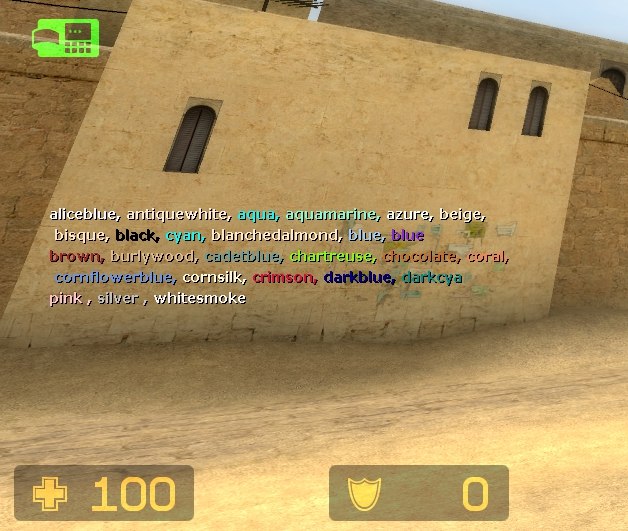
There are also 2 special color codes: {default} and {teamcolor}. {default} resets the chat to its default color and {teamcolor} is replaced with the color code for the client's team in PrintToChatEx and PrintToChatAllEx.
You can see all the colors in action here. Plugin authors: feel free to link to this page in your plugin threads to show users what colors are available.
Download morecolors.inc
Оригинал
Последнее редактирование модератором:


